Mobile App Development: Android vs iOS vs Cross-Platform - A Practical Guide
Building a mobile application in 2026 is rarely just a matter of choosing a framework and starting development.
Modern applications often involve mobile clients, APIs, databases, authentication, cloud infrastructure, third-party services, analytics, payments, notifications, and increasingly AI-powered functionality.
That means the technology decision made at the beginning of a project can have a significant impact on development speed, maintainability, performance, and future scalability.
The most important decision is therefore not which technology is currently trending.
It is which architecture and development approach best match the product.
What Does a Modern Mobile App Architecture Look Like?
A production mobile application typically contains several layers.
At the frontend is the mobile application itself. This is responsible for the user interface, navigation, local state, device capabilities, and interaction with users.
Behind the mobile client is usually a backend layer that handles business logic, authentication, APIs, database operations, integrations, and other server-side processes.
A simplified architecture might look like:
Mobile App → API Layer → Business Logic → Database / External Services
Depending on the application, additional services can include:
Authentication
Payment gateways
Push notifications
Cloud storage
Analytics
Maps and location services
Search
Messaging
AI APIs
Monitoring
Background processing
This is why mobile development should be treated as product engineering rather than only UI development.
Native Android Development
Native Android app development is appropriate when the product requires deep Android integration or platform-specific functionality.
Android applications need to work across a diverse hardware ecosystem.
Developers may need to consider:
Different screen sizes
Device manufacturers
OS versions
Hardware capabilities
Battery constraints
Performance
Network conditions
Permissions
Background processing
A native approach gives the development team direct access to Android platform capabilities.
This can be particularly useful for applications that depend on specialized hardware, advanced device functionality, or platform-specific optimization.
Native iOS Development
iOS app development provides a platform-focused approach for Apple devices.
This can be useful when the application is heavily targeted toward iPhone and iPad users or depends on Apple-specific functionality.
Developers need to consider:
Apple interface guidelines
Device capabilities
App Store requirements
Privacy
Security
Notifications
Performance
Platform-specific APIs
A native iOS application can provide strong control over the platform experience.
React Native and Cross-Platform Development
Cross-platform development is attractive when businesses want applications for both Android and iOS without maintaining two completely independent codebases.
React Native is one of the technologies that can be considered for this type of product.
The primary advantage is code sharing.
Instead of implementing every part of the application independently for Android and iOS, teams can share a significant amount of application logic and UI code.
This can help with:
Faster development
Consistent product behavior
Shared business logic
Easier maintenance
More efficient feature development
However, cross-platform does not mean that native code disappears completely.
Certain features may still require platform-specific implementations.
Examples can include specialized hardware integrations, advanced native APIs, or functionality where platform-level optimization is particularly important.
How Should You Choose?
A practical decision framework looks like this.
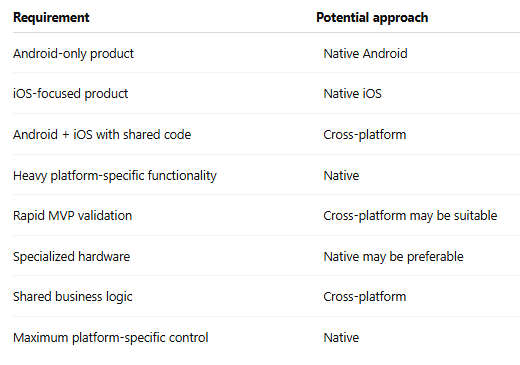
This is not a strict rulebook.
Architecture should always be evaluated against the actual product requirements.
Backend Development Is Equally Important
One common misconception is that mobile app development is mainly frontend work.
In reality, many applications depend heavily on backend infrastructure.
Consider a marketplace application.
The mobile application may display products, vendors, orders, and notifications. But behind those screens, the backend may need to manage:
Users
Vendors
Product catalogs
Orders
Payments
Inventory
Promotions
Reviews
Notifications
Permissions
The same principle applies to enterprise applications.
A mobile interface is only one part of the complete system.
APIs Connect the Mobile Experience
Most modern mobile applications communicate with backend systems through APIs.
The API layer allows the mobile client to request and submit information without directly interacting with the database.
A typical flow might look like:
User Action → Mobile App → API → Backend Logic → Database
The response then travels back through the API to the application.
A well-designed API architecture becomes particularly important when a business also has web applications, admin dashboards, partner portals, or other clients using the same backend.
Security Should Be Designed From the Beginning
Security should not be added after the application has been completed.
A mobile application may process:
Personal information
Payment information
Business data
Authentication credentials
Location information
Documents
Communication data
Security considerations can include:
Secure authentication
Authorization
Encryption
API security
Token management
Secure data storage
Input validation
Rate limiting
Logging
Monitoring
Secure third-party integrations
The exact implementation depends on the application's risk profile and data requirements.
Offline Functionality Can Matter
Mobile users do not always have reliable connectivity.
Applications used by field workers, sales teams, delivery personnel, or remote users may need to continue operating when network connectivity is poor or temporarily unavailable.
An offline-first or offline-capable strategy may involve:
Local data storage
Synchronization
Conflict resolution
Cached content
Retry mechanisms
This is an architectural decision, not simply a UI feature.
Push Notifications and Real-Time Features
Notifications can significantly increase the usefulness of a mobile application.
Examples include:
Order updates
Appointment reminders
New messages
Task assignments
Payment notifications
Marketing messages
System alerts
Applications that require real-time communication may also use technologies that maintain persistent connections or efficiently deliver updated information.
The implementation should be designed around the actual business requirement rather than adding real-time infrastructure unnecessarily.
AI-Powered Mobile Applications
AI can now be integrated directly into mobile products.
Some practical use cases include:
AI Assistants
Users can interact with an application through natural language instead of navigating through multiple screens.
Intelligent Search
AI can help users find information using natural-language queries.
Recommendations
Applications can personalize products, content, or services according to user behavior and preferences.
Document Processing
AI can extract or analyze information from uploaded documents.
Image Analysis
Computer vision can be used for classification, recognition, inspection, or other visual workflows.
Generative AI
Applications can generate text, summaries, responses, recommendations, or other content dynamically.
The technical architecture depends on whether AI processing happens on the device, through an external API, or through the application's own backend infrastructure.
Testing Mobile Applications
Testing a mobile application requires more than checking whether buttons work.
A serious testing strategy can include:
Functional testing
Does each feature behave correctly?
Compatibility testing
Does the application work across supported devices and operating system versions?
Performance testing
Does it remain responsive under realistic conditions?
Security testing
Can sensitive functionality or data be accessed improperly?
Usability testing
Can users complete important workflows without confusion?
Network testing
How does the application behave with slow, unstable, or unavailable connectivity?
Testing should happen throughout development rather than being treated as a final-stage activity.
App Store Deployment Is Part of Development
An application is not finished when the code is complete.
Deployment can involve:
Production configuration
App signing
Store metadata
Screenshots
Privacy information
Permissions
Review requirements
Release management
Versioning
Monitoring
After launch, developers also need to monitor crashes, performance, user feedback, and adoption.
Building for Scalability
Scalability should not mean building an unnecessarily complicated architecture on day one.
Instead, the system should be designed so that it can evolve as demand increases.
For example, an MVP might start with a relatively simple backend.
As usage grows, the architecture may need:
Better caching
Database optimization
Background jobs
Improved monitoring
Load balancing
Service separation
Cloud scaling
The correct architecture depends on the expected product trajectory.
Final Takeaway
There is no universal winner between native and cross-platform mobile development.
Native development can provide deeper platform control.
Cross-platform development can provide code reuse and development efficiency.
Android and iOS each have their own ecosystem considerations.
The best mobile application strategy comes from understanding the product first and selecting the technology second.


